
Stop Staring at the Create a Product Page
Tired of manually filling out WhatNot product listings? LiveSeller Pro automates the tedious parts so you can focus on selling comics.
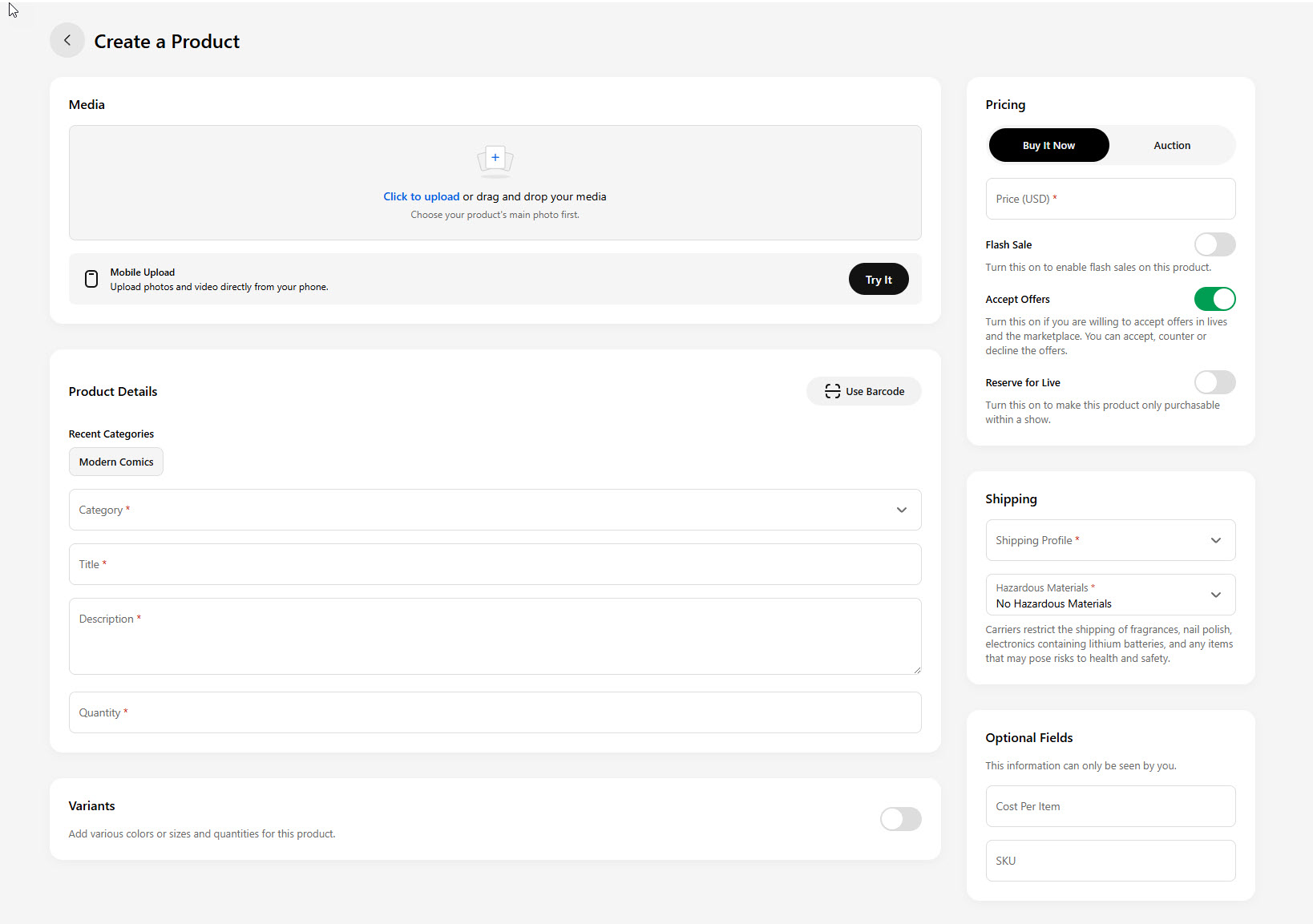
How many times have you stared at this page?
The Whatnot “Create a Product” screen. Media. Category. Title. Description. Quantity. Pricing. Shipping. You know every field by heart because you have filled it out hundreds of times.
One comic at a time. Every single listing, by hand.
If that sounds like your Tuesday night before a Wednesday show, you are not alone. Most comic sellers on Whatnot do it exactly this way. And most of them have thought about quitting at least once because of it.
The Real Cost of Manual Entry
It is not just the time — although the time is brutal. If you have 150 comics to list for your next show, and each one takes two minutes to type in, that is five hours of data entry. Five hours before you even start your stream.
But the real cost is what happens when you rush it. You misspell a title. You pick the wrong category. You forget to set the starting price. You list something as “near mint” when it is not. Small mistakes that add up and make your show look sloppy — or worse, cost you money.
And then there is the stuff you just skip. The descriptions you leave blank because who has time. The listings you never create because the show is in two hours and you still have 60 comics to go. That inventory sits in a box instead of going live.
Here is the math that nobody talks about: if you sell an average of $8 per comic and you leave 40 unlisted because you ran out of time, that is $320 you left on the table. Do that every week and you are losing over $16,000 a year in missed sales — not because you do not have the inventory, but because you could not type fast enough.
Why Manual Listing Is a Trap
The worst part about manual entry is that it does not scale. When you are listing 20 comics a week, it is annoying but manageable. When you grow to 50, it is a second job. At 100 or more, it is physically impossible to keep up without cutting corners or burning out.
Every successful Whatnot seller hits this wall eventually. You want to grow your shows, bring more inventory, do more streams — but the listing bottleneck holds you back. You cannot sell what you cannot list.
Some sellers try to work around it by listing during the show itself, describing items live as they go. That works for a while, but your buyers lose confidence when there are no photos, no descriptions, and no starting prices. Professional sellers who show up prepared outsell improvised shows every time.
You Already Know Your Inventory
Here is the thing that makes manual entry so frustrating: you already have this information. It is in your distributor invoice. It is in your CLZ collection. It is in the spreadsheet you have been keeping on your own. The data exists — you are just retyping it into Whatnot’s form, one field at a time.
Think about that. Your distributor sends you a file with every title, issue number, and quantity. CLZ has your entire collection cataloged with publishers, conditions, and cover images. You might even have your own spreadsheet with pricing notes. All of that data is sitting right there.
And yet, you open Whatnot, click “Create a Product,” and start typing it all over again from scratch.
That is not inventory management. That is data entry. And you did not get into selling comics to do data entry.
There Is a Better Way
Whatnot actually lets you upload all your listings at once using a spreadsheet file. Most sellers do not know this, and the ones who do usually give up because the file has to be formatted in a very specific way. One wrong column and the whole thing fails.
That is the problem LiveSeller Pro Comic Edition solves. You import your inventory from wherever you already have it — a distributor shipment file, a CLZ export, or your own records. LiveSeller Pro Comic Edition cleans it up, flags any issues, and generates a file that Whatnot can read directly.
No more staring at the “Create a Product” screen. No more typing titles one at a time. No more rushing before your show and hoping you did not make a mistake.
How It Works in Three Steps
Step 1: Import your data. Open LiveSeller Pro Comic Edition in Google Sheets and go to the Import Center. Upload your CLZ export, distributor invoice, or any CSV or Excel file with your inventory. LiveSeller Pro Comic Edition reads the format automatically — titles, issue numbers, quantities, conditions — all mapped to the right fields.
Step 2: Review and fix. LiveSeller Pro Comic Edition scans your data and flags anything that needs attention. Missing categories, formatting issues, fields that Whatnot requires but your source file left out. Most problems get corrected automatically. The rest take a few clicks.
Step 3: Export to Whatnot. Hit export. LiveSeller Pro Comic Edition generates a file formatted exactly the way Whatnot expects. Download it, upload it to Whatnot, and your listings are live. Done.
What Your Week Looks Like Instead
- Shipment arrives: Import the file into LiveSeller Pro Comic Edition. Takes seconds.
- Review: Fix any flags, set your prices. Takes minutes.
- Export: Download the file and upload it to Whatnot. Done.
- Show day: Walk in prepared. Every listing is already live.
150 comics listed and ready to sell. Not in five hours — in minutes.
That means more time pulling and organizing your inventory. More time interacting with your buyers during the stream. More time finding new stock instead of typing in old stock. And no more Sunday night panic sessions trying to get everything listed before Monday’s show.
Who Is This For?
LiveSeller Pro Comic Edition is built for comic sellers on Whatnot who are tired of the manual grind. Whether you are listing 30 comics a week or 300, if you have ever thought “there has to be a faster way,” this is it.
It works with CLZ Comics, distributor files from Lunar and PRH, and any CSV or Excel spreadsheet you already have. If your data is in a file, LiveSeller Pro Comic Edition can import it.
You do not need to be technical. You do not need to know how spreadsheet formatting works. You do not need to learn Whatnot’s upload spec. LiveSeller Pro Comic Edition handles all of that.

Strike Hold.
Tired of typing listings one at a time? Start your 14-day free trial of LiveSeller Pro Comic Edition and list your entire inventory at once.