
Three steps. That’s all it takes to go from a messy collection file to clean, ready-to-upload Whatnot listings.
1
Bring in what you already have
You don’t have to start from scratch. If you already track your inventory somewhere, just upload that file.
We support the tools comic sellers actually use:
Your data lands in a clean inventory inside Google Sheets. No new software to install. No account to create beyond what you already have.
2
No more manual cleanup
Imported files are almost never clean. Missing fields, wrong categories, bad formatting — the stuff that takes hours to fix by hand.
Our Smart Import & Auto-Fix engine catches these problems and fixes them for you:
You review the fixes, approve them, and move on. What used to take an hour takes about two minutes.
3
Upload to Whatnot and go live
Right now, most sellers add listings to Whatnot one at a time — typing in the title, picking a category, setting a price, over and over. If you have 200 comics to list, that’s hours of work.
There’s a faster way. Whatnot lets you upload a spreadsheet file (called a CSV) to create all your listings at once. The problem is, you have to format it exactly the way Whatnot expects — right columns, right categories, right fields. Get one thing wrong and the whole upload fails.
We do that part for you. Hit export, and we generate a file that’s already formatted perfectly for Whatnot. Every title, every category, every field — exactly where it needs to be. You just upload it.
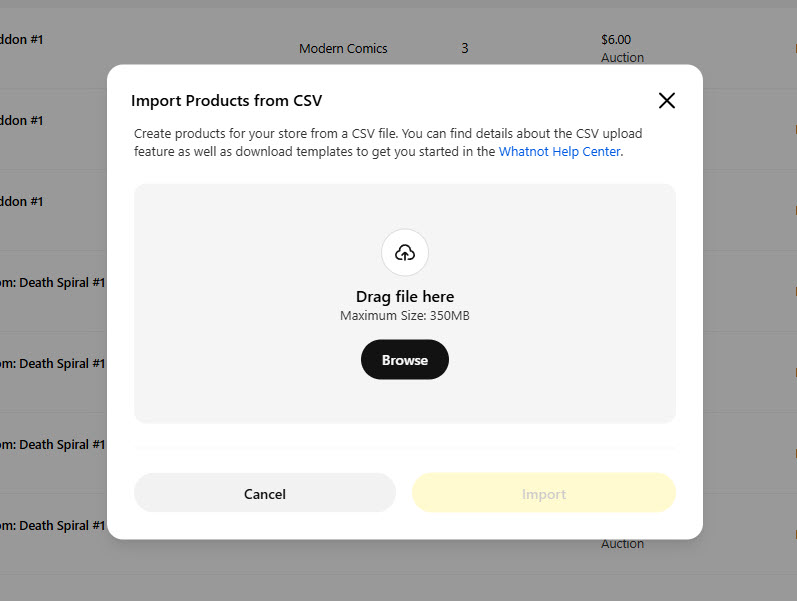
This is the Whatnot upload screen. Your file goes right here.
Upload the file to Whatnot, and your show is ready. That’s it.
Stop typing listings one at a time.
Save hours of manual entry every week — try it free for 14 days.
Start Your Free Trial →Stop typing listings into Whatnot one at a time. Save hours of manual entry every single week.
Minutes
Not hours — show prep that used to eat your whole afternoon
Hundreds
Listings uploaded at once instead of entered one by one
Zero
New tools to learn — it works inside Google Sheets